

.png.429faf55859f5b4d79800a6ce3ce7a68.png)
kiiNg
Administrators
-
Joined
-
Last visited
Everything posted by kiiNg
-
yes it will work for 7.0 to 10.1 and will be updated for latest versions.
-
Advanced Store Directory for CodyChat – Dynamic Vendor Manager with Direct Contact System Transform your CodyChat platform into a thriving Digital Marketplace! Custom Store Manager is a premium addon designed to showcase third-party developers, vendors, and service providers within your chat community. The standout feature is its seamless Frontend Management System—say goodbye to the hassle of navigating the Admin Panel. You can now manage, add, and edit vendor listings directly from the chat interface. Whether you are promoting themes, addons, or custom coding services, this addon serves as the bridge between your users and the right sellers. Key Features🚀 Complete Frontend Management: Admin/Staff can add, edit, or delete store listings directly from the chat panel. 📱 Interactive Modal Interface: Store details open in a beautiful, responsive popup modal, keeping users engaged without leaving the chat screen. 🏷️ Dynamic Category Tags: Categorize listings with professional tags such as Addons, Themes, Login Pages, UserLists, Custom Codes, and Emoji Packs. 💬 One-Click Seller Contact: Integrated "Contact Seller" button that instantly opens a private message (PM) window with the vendor. 🔗 External Store Linking: Each vendor listing includes a "Visit Store" button to redirect users to external portfolios or payment pages. 🖼️ Custom Branding: Option to set a unique Logo URL for every store to maintain a professional look. 🛡️ Built-in Safety Disclaimer: Protect your platform with an integrated Third-Party Disclaimer to minimize liability regarding external payments. 🔒 Smart Input Validation: A secure entry system that prevents empty submissions and ensures data integrity. ⚡ Optimized Performance: Built on CodyChat’s core structure (config_addons), ensuring zero lag and lightning-fast loading speeds. Technical SpecificationsCompatibility: Fully compatible with the latest CodyChat versions. Technology Stack: PHP, MySQLi, jQuery Ajax. Installation: Ultra-fast 1-minute setup (Upload and run install.php). File Information Submitter kiiNg Submitted 02/07/2026 Category Addons View File

-
-
if you want some modern + smooth. <style>.cody-marquee { width: 100%; background: #111; color: #fff; overflow: hidden; white-space: nowrap; } .cody-marquee span { display: inline-block; padding-left: 100%; animation: scroll-rtl 15s linear infinite; } @keyframes scroll-rtl { 0% { transform: translateX(0); } 100% { transform: translateX(-100%); } } </style> <div class="cody-marquee"> <span> CodyChat community gives you the opportunity of making new friends and sharing fun moments with other people.. </span> </div> want to change Speed?animation: scroll-rtl 8s linear infinite; /* fast */animation: scroll-rtl 20s linear infinite; /* slow */
-
there is two way to add message or text in header. 1st is via addons. (create or buy a addons and add that text or change from admin panel). and 2nd is via html and css to add text and then style with css. its pure and clean. and it will be the part of codychat code. you can add this code in your control/chat.php file. <div style="width:100%; background:#111; color:#fff; padding:8px 0; overflow:hidden;"> <marquee direction="left" scrollamount="4"> CodyChat community gives you the opportunity of making new friends and sharing fun moments with other people.. </marquee> </div>
-
you need to add some html code and then css using murqee tag in control/element/top folder
-
can you show me where you want that text (screenshot). you want that text in main chat or userlist. also you want only for dj aur for all members.
-
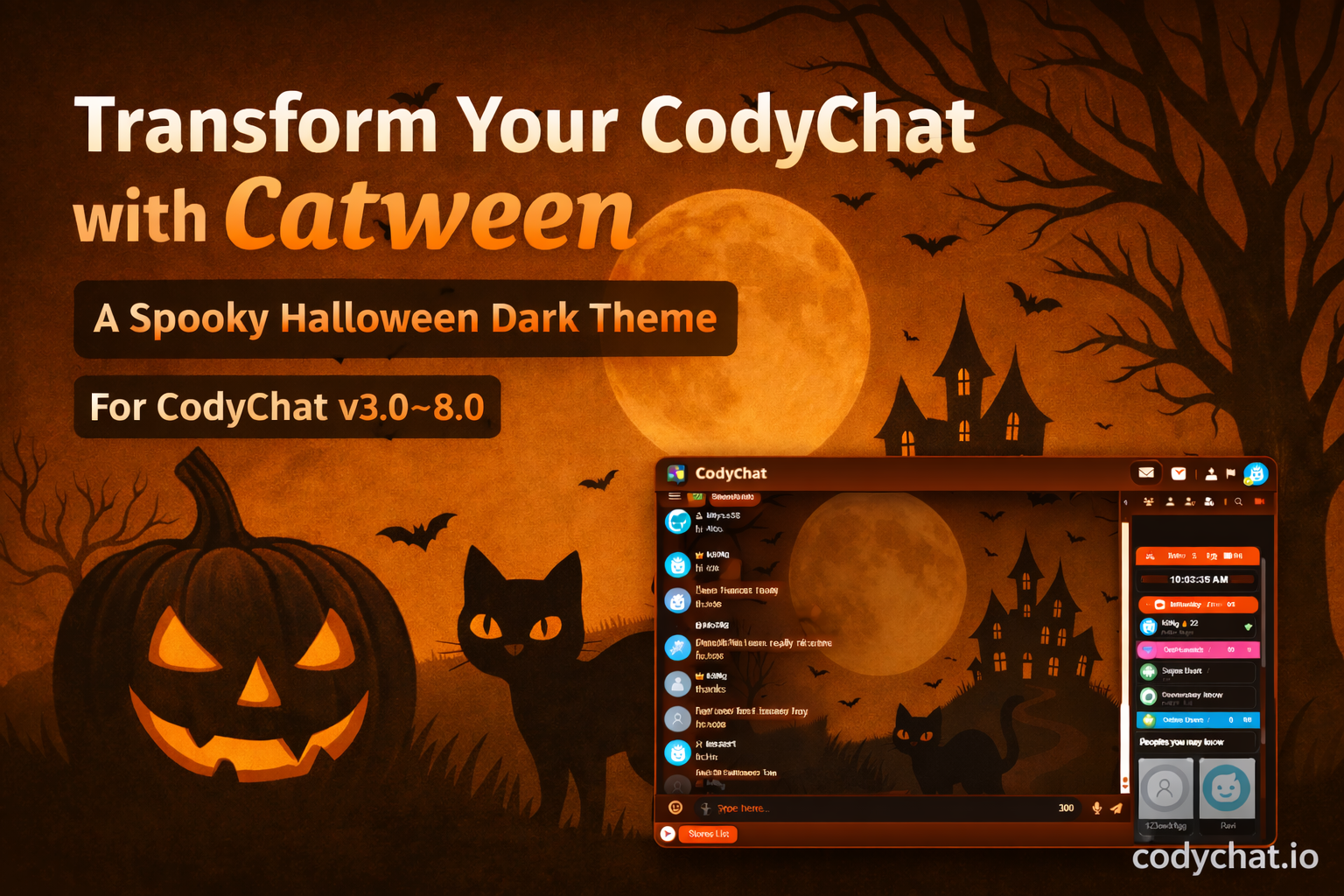
Catween - A Spooky Halloween Codychat Dark Theme Powerful Features of Catween ThemeA fully dark interface designed for night-time chatting with minimal eye strain. Custom-designed chat bubbles with smooth transparency and glow effects. Stylish sidebar gradients Elegant top navigation bars Smooth hover and transition effects Optimized for: Desktop Tablets Mobile devices Minimal CSS ensures: Fast page loading Smooth scrolling Lag-free real-time chatting File Information Submitter kiiNg Submitted 01/03/2026 Category Themes View File
-
-
Learn how to make your avatar rotate smoothly in CodyChat using CSS keyframes. A complete guide with ready-to-use CSS code for rotating and heartbeat animation effects. If you want to make your CodyChat avatar more attractive and animated, a smooth rotating animation is a perfect way to upgrade your chatroom design. CodyChat supports custom CSS, which makes it easy to apply animation effects to any element — including user avatars. This guide will help you add a rotating avatar animation and a heartbeat effect using simple CSS code. Why Add Avatar Animation?Animated UI elements make your chatroom feel modern, professional, and interactive. A rotating avatar gives users a premium feel and helps important profiles stand out in the chat list. Add This Code to css/custom.cssCopy and paste the following CSS code directly into your css/custom.css file: @keyframes rotate-center { 0% { -webkit-transform: rotate(0); transform: rotate(0); } 100% { -webkit-transform: rotate(360deg); transform: rotate(360deg); } } .acav, .avatar_private, .avav, .chat_avatar { -webkit-animation: rotate-center .6s ease-in-out both; animation: rotate-center .6s ease-in-out both; } .orti { -webkit-animation: heartbeat 1.5s ease-in-out infinite both; animation: heartbeat 1.5s ease-in-out infinite both; } @-webkit-keyframes heartbeat { from { -webkit-transform: scale(1); transform: scale(1); } 10% { -webkit-transform: scale(.91); transform: scale(.91); } 17% { -webkit-transform: scale(.98); transform: scale(.98); } 33% { -webkit-transform: scale(.87); transform: scale(.87); } 45% { -webkit-transform: scale(1); transform: scale(1); } } What This Code Doesrotate-center rotates the avatar from 0° to 360°. The classes .acav, .avatar_private, .avav, .chat_avatar automatically apply the rotate animation to all chat avatars. The .orti class creates a heartbeat (pulse) effect for special icons or avatars. Where to Paste the CodeGo to: css/custom.css Paste the code at the top or bottom of the file and save it. After refreshing your chatroom, your avatars will start rotating automatically. How to Use the Heartbeat EffectTo apply the heartbeat animation to any avatar or icon, simply add the class: class="orti" This makes the element pulse gently, giving it a spotlight effect. ConclusionWith just a few lines of CSS, you can completely transform the appearance of your CodyChat avatars. Whether you choose the rotation effect, heartbeat animation, or both, these simple adjustments will give your chatroom a modern and eye-catching look. If you need more CodyChat CSS tricks, animations, or UI customization guides — just tell me!
-
Buy Me Coffee Addon for CodyChat The Buy Me Coffee Addon adds a simple and effective way for CodyChat owners to receive user support and donations directly through the platform. It introduces a customizable “Support / Buy Me a Coffee” button or box that appears to users and redirects them to any external donation link of your choice. ⭐ Key Features🔹 Custom Donation Link Set any external support link such as BuyMeACoffee, Ko-fi, PayPal, or any custom URL. 🔹 Integrated Settings Page Includes a dedicated settings section inside the CodyChat admin dashboard for managing the addon. 🔹 Multilingual Support All displayed text is fully translatable, allowing you to match the language of your platform. 🔹 Clean and Lightweight UI Component Adds a simple, responsive support button/box that fits naturally with CodyChat’s interface. 🔹 Full Compatibility with CodyChat Addon System Installs and integrates smoothly with the CodyChat ecosystem without conflicts or performance issues. 🎯 Why This Addon Is UsefulProvides an effortless way for users to support the platform or developer. Helps generate donations to maintain and grow your community. Works with any payment or donation service via a custom link. Adds professionalism and a modern touch to your CodyChat installation. ✔ CompatibilityFully compatible with CodyChat v+6.0 Works seamlessly across all device sizes File Information Submitter kiiNg Submitted 11/30/2025 Category Addons View File
-
-
Bet Gold Addon for CodyChat A thrilling luck-driven game add-on: place a gold wager and win a reward that could be multiplied, matched, or reduced — all depending on your luck! File Information Submitter kiiNg Submitted 11/30/2025 Category Addons View File
-
-
Bobby – AI Assistant Addon for CodyChat (Premium) v1.0.0 Bobby is the ultimate AI-powered addon for CodyChat, designed to bring intelligence, wit, and personality into your chat platform. This addon seamlessly integrates OpenAI’s ChatGPT technology, allowing your users to experience smart, natural, and interactive conversations — just like chatting with a real human! With Bobby, you can transform your CodyChat experience by introducing a virtual assistant that’s always active, engaging, and knowledgeable. Whether your users need help, entertainment, or casual conversation, Bobby delivers it effortlessly. Key Features🤖 AI Chat Integration: Powered by OpenAI ChatGPT for intelligent, human-like conversations. 💬 Seamless CodyChat Integration: Works smoothly within your existing chat system. ⚙️ Customizable Settings: Adjust AI tone, response behavior, and personality style. 🧠 24/7 Virtual Assistant: Always available for instant responses. 🌐 Multilingual Support: Engage users worldwide with multi-language capabilities. 🔒 Private and Secure: No data leaks — all communication stays within your chat environment. How It WorksOnce installed, Bobby connects with your OpenAI API key and integrates directly into the CodyChat system. Users can start chatting with the AI assistant through a designated bot name or trigger command. The setup process is quick and doesn’t require any coding expertise. Requirements✅ CodyChat version 4.5 or higher 🔑 Valid OpenAI API key Why Choose Bobby?Bobby turns ordinary chats into engaging, intelligent conversations. Whether you’re running a community chatroom, a support group, or a social platform, this addon enhances user engagement and makes your chat more interactive and futuristic. Tip|: if you Buy Lisence From Us you will get free this addons. File Information Submitter kiiNg Submitted 10/29/2025 Category Addons View File
-
 $59
$59 -
CodyChat – The Next Generation PHP & AJAX Chatroom CodyChat by BoomCoding is a powerful real-time PHP and AJAX chatroom system, designed to bring people together in a fast, responsive, and interactive environment. Built for performance and flexibility, CodyChat transforms any website into a vibrant social community — allowing users to chat, share media, make friends, and stay connected effortlessly. CodyChat is not just a chat script — it’s a complete communication platform that combines modern design, secure architecture, and extensive customization options. Whether you’re building a small community or a full-scale social network, CodyChat adapts perfectly to your needs. Key Features💬 Real-Time Chat SystemEnjoy seamless communication with instant message delivery powered by optimized AJAX requests — no page reloads required. 👥 User Profiles & FriendsEvery member gets a personalized profile and the ability to add, remove, and manage friends for private interactions. 📨 Private MessagingSend and receive direct messages securely between users without leaving the main chat interface. 🖼️ File Sharing SupportCodyChat allows sharing of images, videos, documents, and even compressed files — all safely managed through its upload system. 🌐 Online Status & RanksUsers can set their current status (Online, Away, Busy, Offline), while admin-defined ranks control user powers and permissions. 🎨 Themes & AddonsFully supports custom themes and addons, allowing developers and owners to completely change the appearance or expand functionality — no core modification needed. 🔄 Bridges & IntegrationsConnect CodyChat with other platforms like WordPress, Sengine, and other CMS systems using official and community-made bridges — offering single sign-on and shared user data. 🧰 Admin PanelA clean and powerful admin panel lets you control users, ranks, rooms, bans, themes, addons, and system settings — all from one place. Why CodyChat?⚙️ Built with PHP + AJAX for smooth, fast real-time communication 🔒 Secure and stable with advanced validation and moderation options 📱 Responsive design that works on all devices — desktop, tablet, and mobile 🧩 Modular system allowing unlimited customization 🌍 Multilingual support for global communities 💡 Easy installation with ready-to-use setup wizard Ideal ForCodyChat is perfect for: Community and gaming websites Dating or social platforms Team collaboration tools Educational chatrooms Customer support chat systems Requirements✅ PHP 7.4 or higher ✅ MySQL Database ✅ HTTPS enabled (recommended) ✅ CodyChat v9.0 or higher for themes & addons ConclusionCodyChat by BoomCoding redefines online chatting by blending simplicity, power, and flexibility. It’s the perfect solution for anyone who wants to build an engaging online community without relying on external servers or complex frameworks. With its modular architecture, addons, themes, and bridges, CodyChat gives developers and site owners complete freedom to create a unique, interactive, and modern chat experience. If you’re looking for a real-time chat system that’s fast, secure, and expandable, CodyChat is the one you’ve been waiting for. File Information Submitter kiiNg Submitted 10/27/2025 Category Codychat Updates View File
-
 The Sengine Bridge is a powerful integration tool designed to connect your Sengine CMS with CodyChat effortlessly. This bridge acts as a seamless connector between your existing website and the CodyChat login system, ensuring a unified user experience across both platforms. With the Sengine Bridge, you can easily synchronize your website’s users with CodyChat. Once integrated, it automatically imports essential user data from your CMS, eliminating the need for manual account creation. This bridge smartly replaces the traditional CodyChat login with a specialized login mechanism that is exclusive to your website members — allowing them to join the chatroom with a single click. No extra registrations, no confusion — just smooth, instant access for your users. Key Features🔗 Seamless Integration – Connects Sengine CMS and CodyChat without complex setup. 👥 Auto User Sync – Automatically imports and manages user accounts from your CMS. 🚀 One-Click Login – Members can access CodyChat instantly without a separate login form. 🔒 Member-Only Access – Restricts chatroom access to registered website users only. ⚙️ Effortless Setup – Designed to work out of the box with minimal configuration. Requirements✅ Sengine CMS Installed ✅ CodyChat Requirements Apply ConclusionIf you’re using Sengine CMS and want to create a unified community experience, the Sengine Bridge for CodyChat is the perfect solution. It simplifies the login process, strengthens user management, and enhances your site’s overall interactivity — making your chat platform feel like a natural part of your website.Free
 -
Arc – Codychat Theme Arc is a beautifully designed CodyChat theme crafted to give your chatroom a fresh, modern, and immersive experience. CodyChat themes like Arc integrate seamlessly into your existing installation — simply upload the theme to your themes folder and activate it from your admin panel. No advanced technical skills are required! With Arc, your members can enjoy a distinctive look and feel, making every chat session more engaging, enjoyable, and visually appealing. ⚙️ Key FeaturesSeamless integration with CodyChat 9.0+ Clean and responsive layout Easy installation — just upload and activate Fully compatible with all CodyChat features Designed for a smooth and modern chat experience 💬 Requirement: CodyChat 9.0 or higher 💡 Tip: You can easily customize colors, backgrounds, and branding to match your community’s style for a truly personalized chat environment. File Information Submitter kiiNg Submitted 10/26/2025 Category Themes View File
-
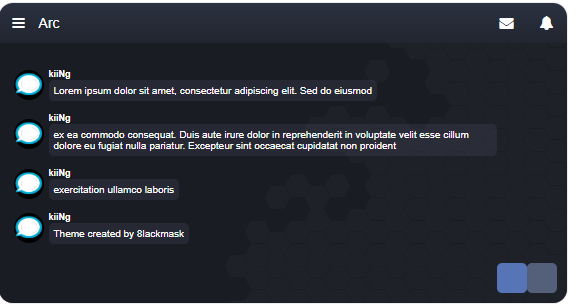 Arc is a beautifully designed CodyChat theme crafted to give your chatroom a fresh, modern, and immersive experience. CodyChat themes like Arc integrate seamlessly into your existing installation — simply upload the theme to your themes folder and activate it from your admin panel. No advanced technical skills are required! With Arc, your members can enjoy a distinctive look and feel, making every chat session more engaging, enjoyable, and visually appealing. ⚙️ Key FeaturesSeamless integration with CodyChat 9.0+ Clean and responsive layout Easy installation — just upload and activate Fully compatible with all CodyChat features Designed for a smooth and modern chat experience 💬 Requirement: CodyChat 9.0 or higher 💡 Tip: You can easily customize colors, backgrounds, and branding to match your community’s style for a truly personalized chat environment.Free
 -
Yes, absolutely! The default CodyChat logo is simply a placeholder image included in the design to fill that space. Once you’ve purchased a license, you are free to replace it with your own logo or branding image. You can easily change it by replacing the logo file in your chat’s image folder or by editing the header section in the theme files. 💡 Tip: Use a transparent .PNG logo for the best visual results across both light and dark themes.
-
Unfortunately, no — license transfers between user accounts are not allowed. This policy is in place to protect the security and integrity of our customers’ accounts and licenses. Only authorized resellers are permitted to transfer licenses under specific conditions. 💡 Note: If you need to move your license to a new domain under the same account, that may be possible depending on your license terms. Contact support for assistance before making any changes.
-
That’s a great question! CodyChat is a powerful PHP/AJAX-based chat system that has been thoroughly tested for over a year by multiple beta testers on different types of hosting environments — including shared, VPS, and dedicated servers. 💡 Real-World Testing ResultsWhile it’s impossible to give an exact number — because performance depends on many factors such as: Server RAM and CPU speed Server location Number of active private chats Message frequency Enabled features and settings Here’s what we observed during our tests: Shared hosting: 50+ online users VPS servers: 300+ online users Dedicated servers: 2000+ online users These numbers may vary based on your hosting quality and configuration. 🚀 Need More Power?If you’re planning to run a chat with 10,000 or more simultaneous users, we recommend having a custom chat system built specifically for high scalability and performance.
-
CodyChat uses IonCube to protect specific parts of its core code. IonCube is a widely used PHP encryption module supported by most modern hosting providers. 🧠 Why IonCube Is UsedWe’ve chosen to use IonCube to: Secure the core functionality of the chat system. Prevent unauthorized code modifications. Ensure stability and protection of licensed software. While the core files are encrypted for security reasons, you can freely edit all HTML, CSS, and visual elements to customize the appearance and layout of your chat. ⚙️ Good to KnowIonCube is included in most hosting environments by default. If it’s not enabled, you can easily activate it from your hosting control panel or ask your hosting provider to do it.
-
Yes, you can purchase addons developed outside the official CodyChat store. However, there are a few important things to keep in mind before doing so: ⚠️ Important NotesOnly addons purchased from the official CodyChat store are guaranteed to be secure, fully compatible, and properly tested with all CodyChat features. Third-party addons may cause compatibility issues, bugs, or security vulnerabilities. The CodyChat support team at BoomCoding.com does not provide support for addons purchased or downloaded from external sources. Official support and updates apply only to addons sold through our official marketplace. 💡 Recommendation: For the best performance, stability, and continued updates — always purchase addons directly from the official CodyChat store.
.thumb.png.82908c3678f30e5842c981302df4b424.png)